

 Take advantage of a wealth of training materials designed to help you learn new skills and become more successful in what you do. Check out the Online "Rotary Learning Center."
Accessing Rotary’s Learning Center is easy, and you’ll soon be taking courses and finding resources about the topics that matter to you the most.
• If you haven’t used the Learning Center yet, go to rotary.org/learn, sign in to My Rotary, and accept the privacy policy to enable your access. Direct links to courses work only if you have visited the Learning Center before.
• If you need to create a My Rotary account, use the same email address that your club has on file. If that email isn’t valid, ask your club secretary to update the club’s record in Rotary International’s membership database.
• If you haven’t used the Learning Center yet, go to rotary.org/learn, sign in to My Rotary, and accept the privacy policy to enable your access. Direct links to courses work only if you have visited the Learning Center before.
• If you need to create a My Rotary account, use the same email address that your club has on file. If that email isn’t valid, ask your club secretary to update the club’s record in Rotary International’s membership database.
• If you have difficulty signing in to My Rotary, write to data@rotary.org.
• You will find this homepage (↓) for members and this one (↓) for nonmembers:
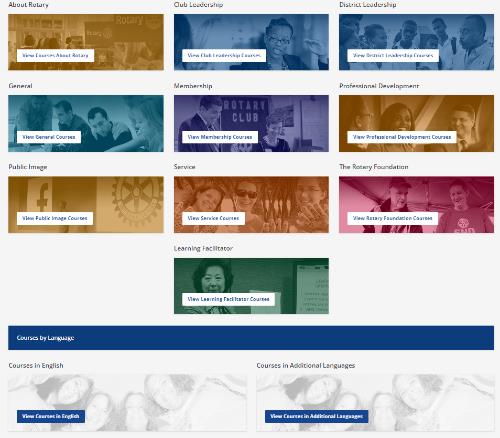

• If you have the nonmember page, you likely have duplicate accounts in our database. This means your My Rotary/Learning Center account isn’t attached to your club. Write to data@rotary.org to merge your accounts.
• Use a laptop or a desktop computer for the best experience when you take a course. If you use a mobile device, use the Google Chrome browser, sign in to My Rotary, select Knowledge & Resources, then Learning Center, and follow the instructions in this mobile guide.
• If you’re new to the Learning Center, take Getting Started With the Learning Center as your first course.
Support - If you need help, write to learn@rotary.org. Include:
• What browser you’re using
• What browser you’re using
• Screenshots of the error message you got or a detailed explanation of the problem
• Which course link you used or how you tried to access the Learning Center
Once you’ve started using the Learning Center, follow us on Facebook for updates, tips, and announcements about new courses. You can also subscribe to our Learning in Action newsletter.