|
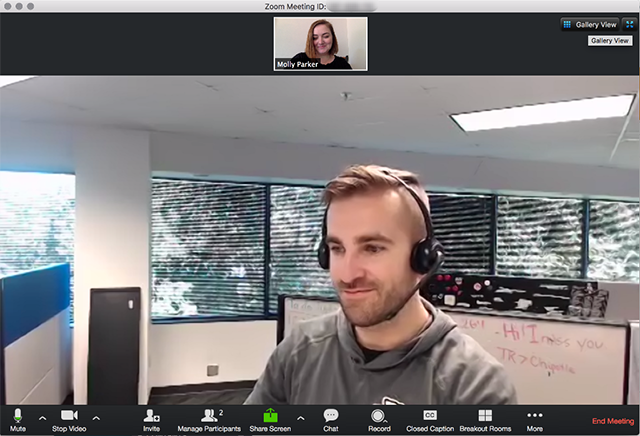
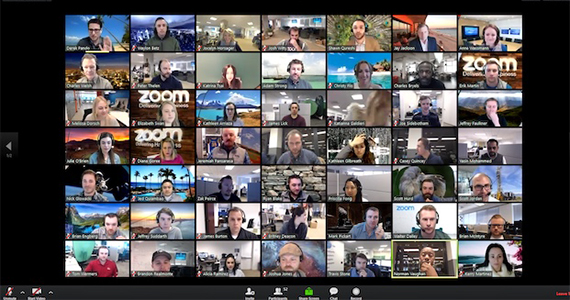
We are planning to have our first online Rotary meeting on Wednesday, April 8, at noon. The board is meeting today via Zoom and will have some experience prior to the club experience! Many members are already using ZOOM to work remotely, children or grandchildren are using it for distance learning. If you missed the link given for a tutorial above, you can explore resources by clicking the blue ZOOM logo opening this article. Here's how it will work: 1) use your phone, ipad, tablet or computer. Whatever you choose, you must have camera and microphone enabled. 2) have it charged or plugged in, 3) make sure your environment is quiet, and close doors to help with sound. 4) headphones/earphones with audio enabled will help you and others hear more clearly. 5) download the program ahead of time if you like. You can find it in the App Store for iOS and the Google Play store for android. For windows, use your browser and go to the ZOOM website. You don't need to create an account, but you can! 6) Wayne will send an email inviting you to join his meeting. Keep track of it so that you have the link. 7) Click on Wayne's email link and join the meeting. 8) When you join, you may see Wayne or rectangles showing everyone in the room. As we move through the process, we can help each other find the view you want. Here are pictures of both. Active Speaker: Gallery view (everyone): If you have problems, contact Wayne, Emily, Joe, or Barb. SEE YOU THEN! |




.png)